X shows trending topics in its app, but there is no page you can scrape politely and the official API puts trends behind its paid tiers. This guide gets the same list from code: the topics trending worldwide, in one country or in a single city, with the tweet count where X gives one. It then logs the list over time and fetches the tweets behind a trend.
We run TwittrAPI, which the steps below use. The trend data is X's own and is public.
Step 1: Get an API key
Create a key on /start. New accounts get $0.50 of test credit for 7 days. Keep it in an environment variable:
export TWITTRAPI_API_KEY="your-key"Step 2: Find the location ID
Trends belong to a place, and places are identified by a WOEID (a Yahoo "where on earth" ID). GET /misc/locations lists every place X has trends for, with its name, country and type:
import os

import requests

API = "https://api.twittrapi.com"
HEADERS = {"X-API-KEY": os.environ["TWITTRAPI_API_KEY"]}

places = requests.get(f"{API}/misc/locations", headers=HEADERS, timeout=30).json()
for p in places:
    if p["country"] in ("Germany", "Japan"):
print(p["woeid"], p["name"], p["placeType"]["name"])A few IDs you will use often: 1 is worldwide and 23424977 is the United States. Look up the rest once and keep them in your config. The list covers every country and city X has trends for, so the response is large (around 85 KB); fetch it once, not on every run.
Step 3: Call the trends endpoint
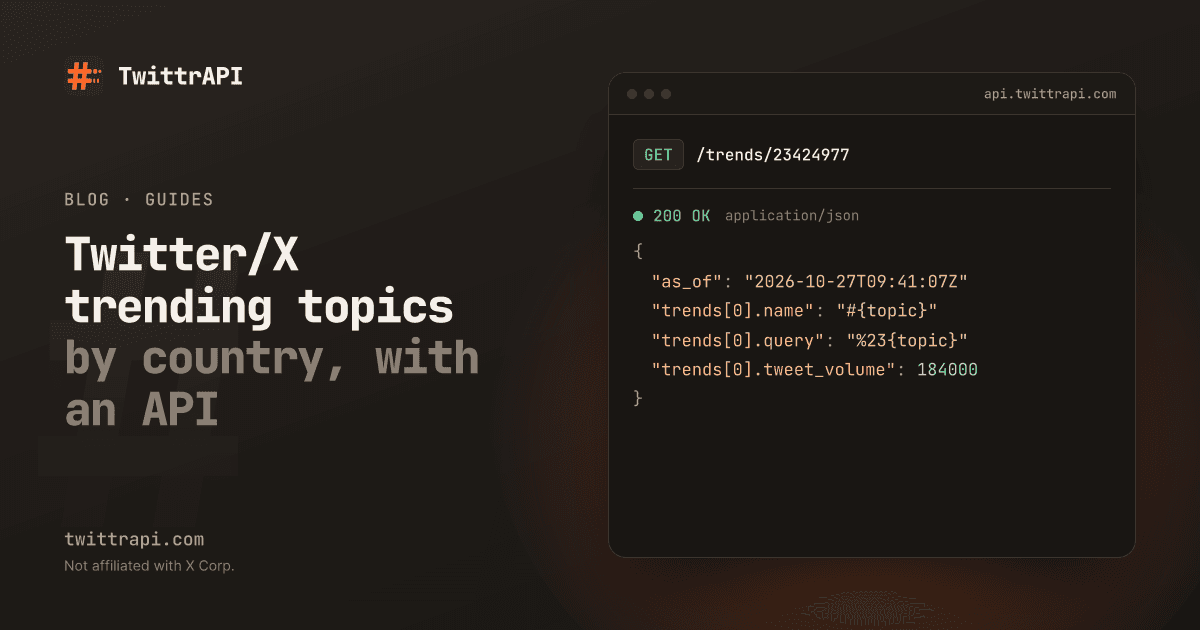
GET /trends/{locationId} returns the current list for a place:
curl 'https://api.twittrapi.com/trends/1' -H "X-API-KEY: $TWITTRAPI_API_KEY"The response is X's own trends format, not the simplified one: an array with one object that holds trends, as_of and locations. Each trend has a name, a url, a query you can pass to search, and a tweet_volume.
data = requests.get(f"{API}/trends/23424977", headers=HEADERS, timeout=30).json()[0]
print("as of", data["as_of"])
for i, t in enumerate(data["trends"][:10], 1):
    volume = t["tweet_volume"] or "-"
print(f"{i:>2}. {t['name']} ({volume})")tweet_volume is null for many trends. X only reports a count when it is large enough, so treat it as a bonus and not as a field you can sort by.
Step 4: Log trends over time
A single list tells you what is hot now. A log tells you what rises, how long it stays and when it peaks. Append the list to a CSV on a schedule, for example from cron or a GitHub Action every 30 minutes:
import csv
from datetime import datetime, timezone

now = datetime.now(timezone.utc).isoformat(timespec="seconds")
rows = [
    [now, rank, t["name"], t["tweet_volume"] or ""]
    for rank, t in enumerate(data["trends"], 1)
]
with open("trends.csv", "a", newline="") as f:
csv.writer(f).writerows(rows)Each run is one call, so logging one place every 30 minutes costs 48 calls a day, which is $0.10 per 1,000 on Standard. Log several countries by looping over their IDs; every place is its own call.
Step 5: Read the tweets behind a trend
Every trend carries a query. It is already URL-encoded (%22Big+Q%22 for the trend "Big Q"), so decode it before you pass it to GET /search, which encodes it again:
from urllib.parse import unquote_plus

top = data["trends"][0]
r = requests.get(
    f"{API}/search",
    headers=HEADERS,
    params={"searchItem": unquote_plus(top["query"]), "category": "Latest", "format": "simple"},
    timeout=30,
)
for tweet in r.json()["data"][:5]:
    if not tweet.get("unavailable"):
print(tweet["createdAt"], tweet["text"][:100])Use Top instead of Latest if you want the most visible posts first. The search guide covers the operators and paging.
Node.js version
npm install twittrapiimport { TwittrAPI } from "twittrapi";
const client = new TwittrAPI(); // key from TWITTRAPI_API_KEY
const [list] = await client.trends.get(23424977);
console.log("as of", list.as_of);
for (const t of list.trends.slice(0, 10)) {
console.log(t.name, t.tweet_volume ?? "-");
}The Python SDK has the same calls: client.trends.get(1) and client.trends.locations().
Ideas that use it
- A morning digest: send the top ten for your country to Slack or Telegram every day at 8:00.
- Content planning: check which topics trend in your market before you write.
- Early signals: log trends and flag any topic that enters the top ten for the first time.
- Cashtag and brand checks: look for your brand or a ticker in the list and, if it shows up, start a search on it.
Common problems
tweet_volumeis null: X gives no count for that trend. Do not read it as zero.- An empty list: some places have no trends at times. Try the country instead of a city.
- A 400 error: the ID is not a number. Use digits only (1 to 12 of them), the WOEID from the locations list.
- Trends differ from your app: the app can show a list adjusted to you. The API returns the list for the place you ask for.
Frequently asked questions
How do I get trending topics from X with an API?
Call the trends endpoint with a location ID (WOEID). You get the current list with each topic's name, search query and, where available, the tweet count. TwittrAPI needs only its own key, no X developer account.
What is a WOEID?
A Yahoo "where on earth" ID that X uses for places. 1 is worldwide and 23424977 is the United States. The locations endpoint lists all supported places.
How often do trends change?
X does not publish an update interval. Every 15 to 60 minutes is a sensible interval for a log; compare two runs to see how fast the list moves for your place.
Can I get trends for a city?
Yes, if X offers trends for that city. Find it in the locations list; places of type Town are cities.
How much does it cost?
One call per place. On TwittrAPI that is $0.10 per 1,000 calls on Standard and less at volume, so checking one country hourly costs a few cents a month.
Sources
- Trends by location and Trend locations: parameters and response fields
- Search endpoint reference: using a trend's query
TwittrAPI is not affiliated with X Corp. It reads only public data.